The Product:
The Product:
Project Duration:
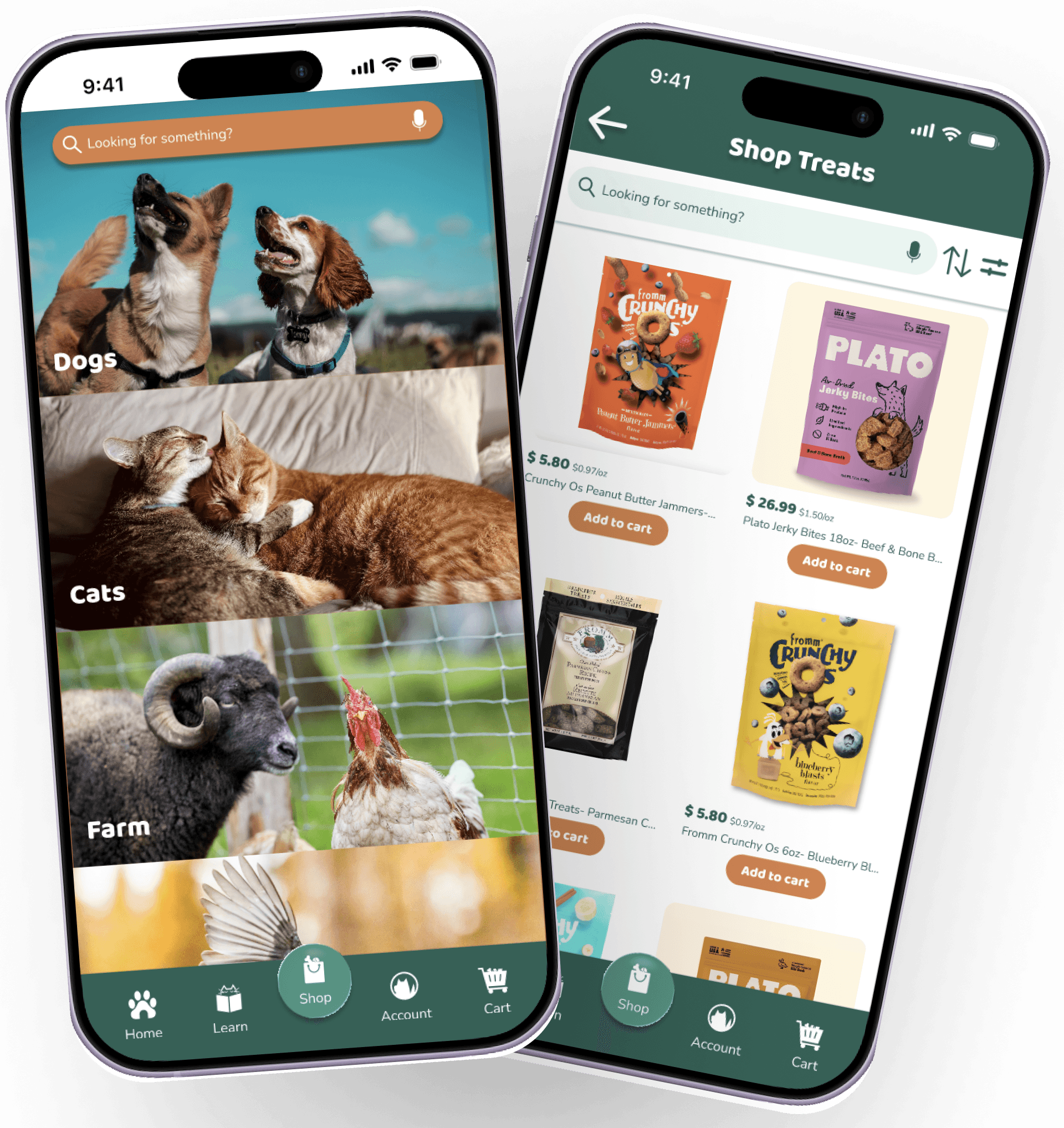
Smokey Mountain Feed and Pet Supply (SMF) is an independent pet food and supply store in Maryville, TN. The store has been a part of the community for over 30 years and is slowly starting to create their online presence and digital products. This app’s primary goal is to provide the smoothest shopping experience for customers within the means of the business.
Smokey Mountain Feed and Pet Supply (SMF) is an independent pet food and supply store in Maryville, TN. The store has been a part of the community for over 30 years and is slowly starting to create their online presence and digital products. This app’s primary goal is to provide the smoothest shopping experience for customers within the means of the business.
Four weeks, May 2026
The Problem:
The Problem:
My Role:
My Role:
Responsibilities:
The Goal:
SMF is a small business in a growing, yet slow moving community. Many older customers are averse to change, but the growing population of young pet owners expect certain conveniences that have become standard with modern technology.
SMF is a small business in a growing, yet slow moving community. Many older customers are averse to change, but the growing population of young pet owners expect certain conveniences that have become standard with modern technology.
This is an individual project that allowed me to gain experience in each step of the design process as a UX design student.
This is an individual project that allowed me to gain experience in each step of the design process as a UX design student.
Conduct and analyze user research
Create user flows and storyboards
Wireframing
Create hi and low-fi prototypes
Usability testing
Create an app that allows customers to order online for in-store or drive-up pickup, check inventory before making a trip, monitor promotions and rewards, and learn about products for their pets.
Create an app that allows customers to order online for in-store or drive-up pickup, check inventory before making a trip, monitor promotions and rewards, and learn about products for their pets.
Create an app that allows customers to order online for in-store or drive-up pickup, check inventory before making a trip, monitor promotions and rewards, and learn about products for their pets.
Create an app that allows customers to order online for in-store or drive-up pickup, check inventory before making a trip, monitor promotions and rewards, and learn about products for their pets.
Responsibilities:
Responsibilities:
Conduct and analyze user research
Create user flows and storyboards
Wireframing
Create hi and low-fi prototypes
Usability testing
Conduct and analyze user research
Create user flows and storyboards
Wireframing
Create hi and low-fi prototypes
Usability testing
Conduct and analyze user research
Create user flows and storyboards
Wireframing
Create hi and low-fi prototypes
Usability testing
The Goal:
Project Duration:
Four weeks, May 2026
The Goal:
Project Overview
Mockups - High Fidelity Prototypes - Accessibility - Mockups - High Fidelity Prototypes - Accessibility - Mockups - High Fidelity Prototypes - Accessibility
Mockups - High Fidelity Prototypes - Accessibility - Mockups - High Fidelity Prototypes - Accessibility - Mockups - High Fidelity Prototypes - Accessibility
Refining the Design
Refining the Design
Mockups
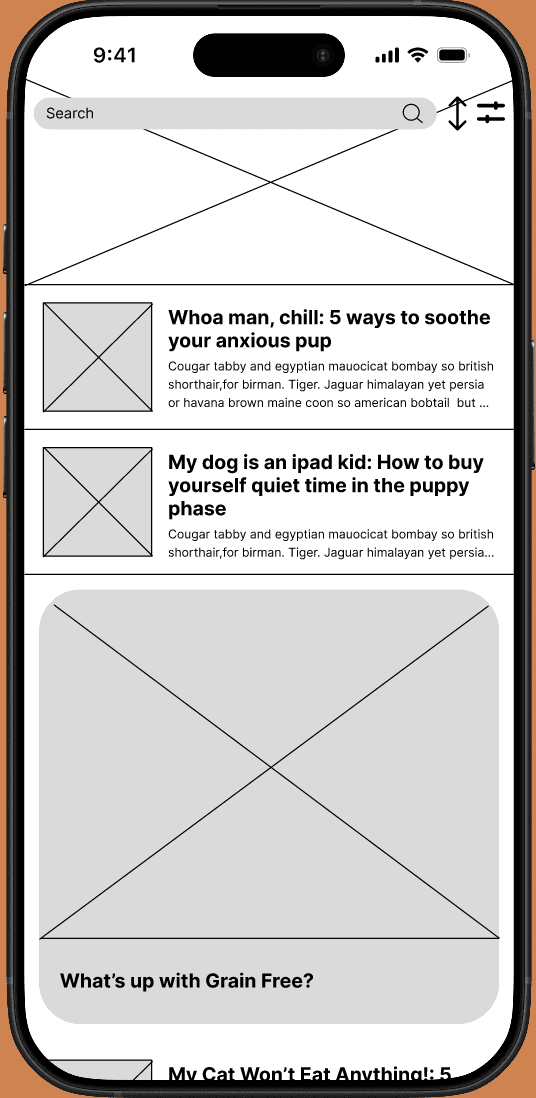
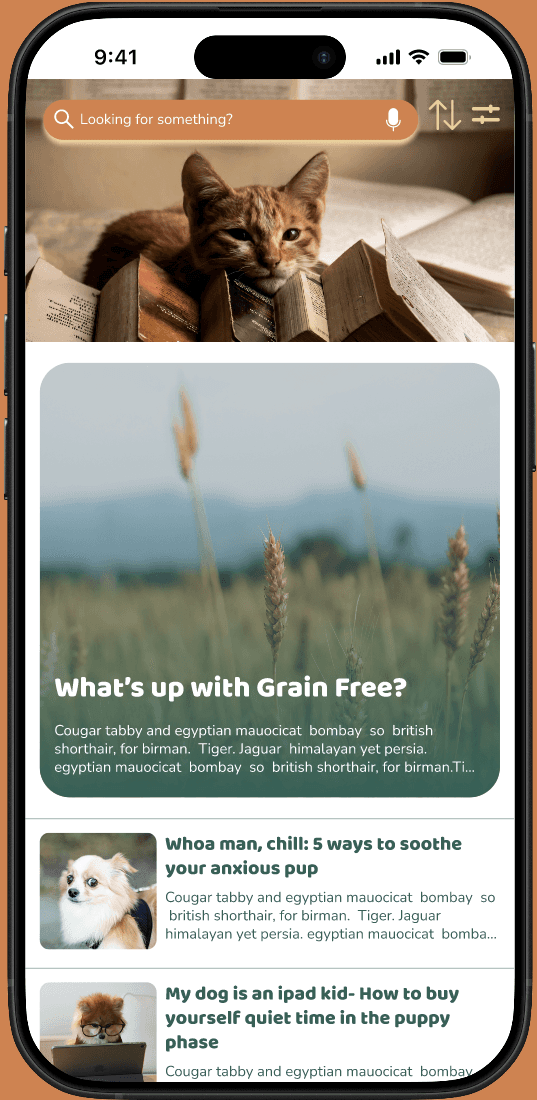
I used insight 1 from my usability study to tweak the learn page so that the layout would be easier to navigate.
The featured article was moved to the top of the page so that it is fully visible above the fold
Sneak peek text was added to the featured article to indicate that clicking it will lead to a full article
I used insight 1 from my usability study to tweak the learn page so that the layout would be easier to navigate. The featured article was moved to the top of the page so that it is fully visible above the fold and sneak peek text was added to the featured article to indicate that clicking it will lead to a full article
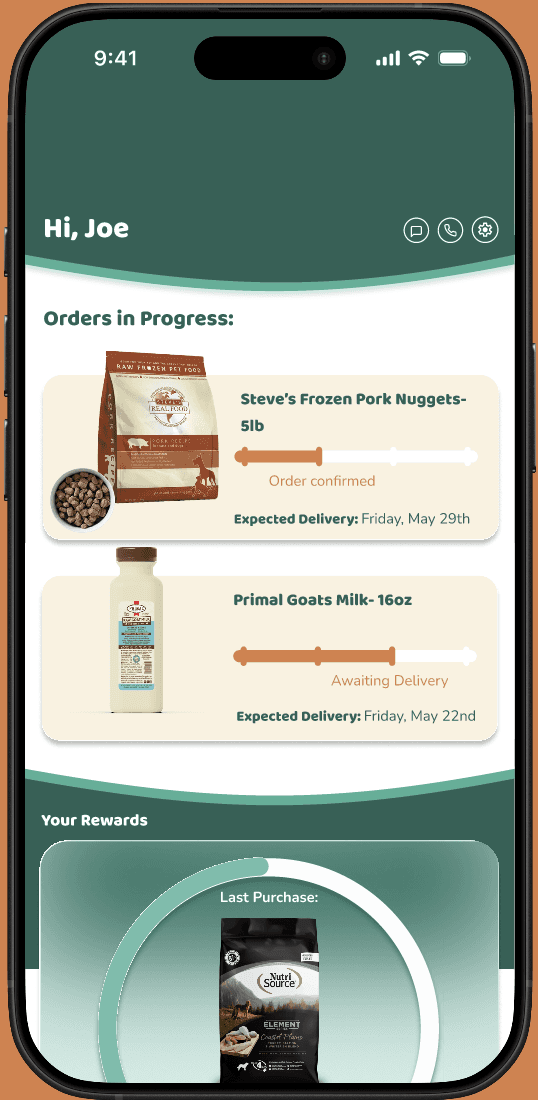
Based on insight 2, I changed the ‘orders in progress’ cards in order to make the text easier to read.
I also added the expected delivery date to the cards so that users feel more informed about their orders.
Based on insight 2, I changed the ‘orders in progress’ cards in order to make the text easier to read.
I also added the expected delivery date to the cards so that users feel more informed about their orders.
Before Usability Study:
After Usability Study:
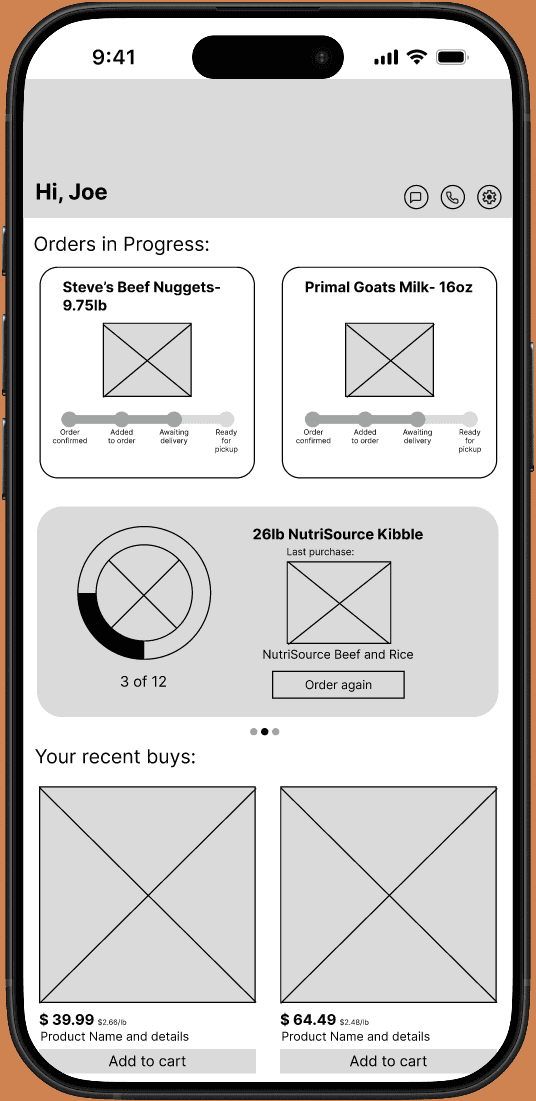
Before Usability Study:
After Usability Study:
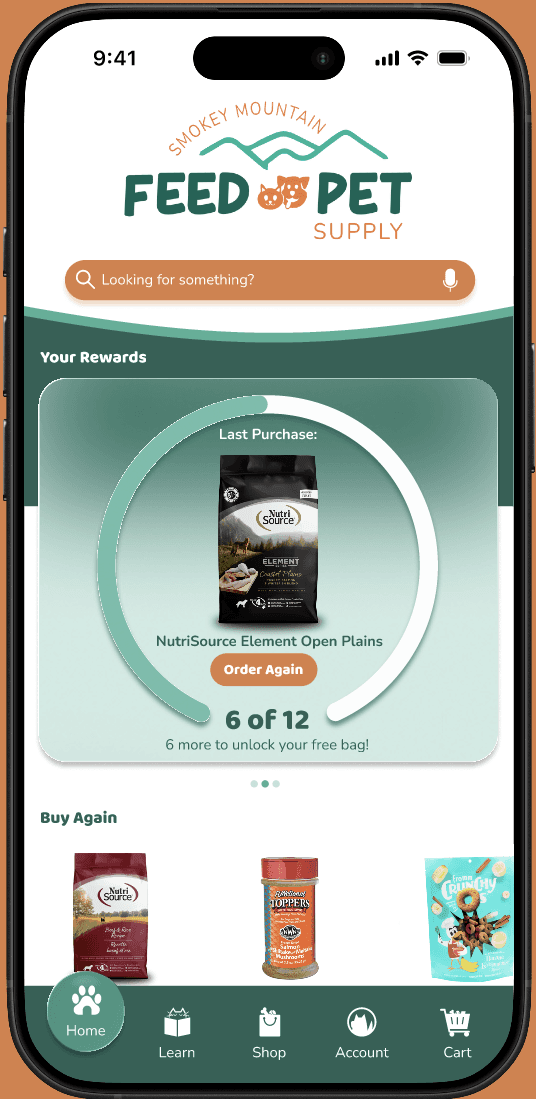
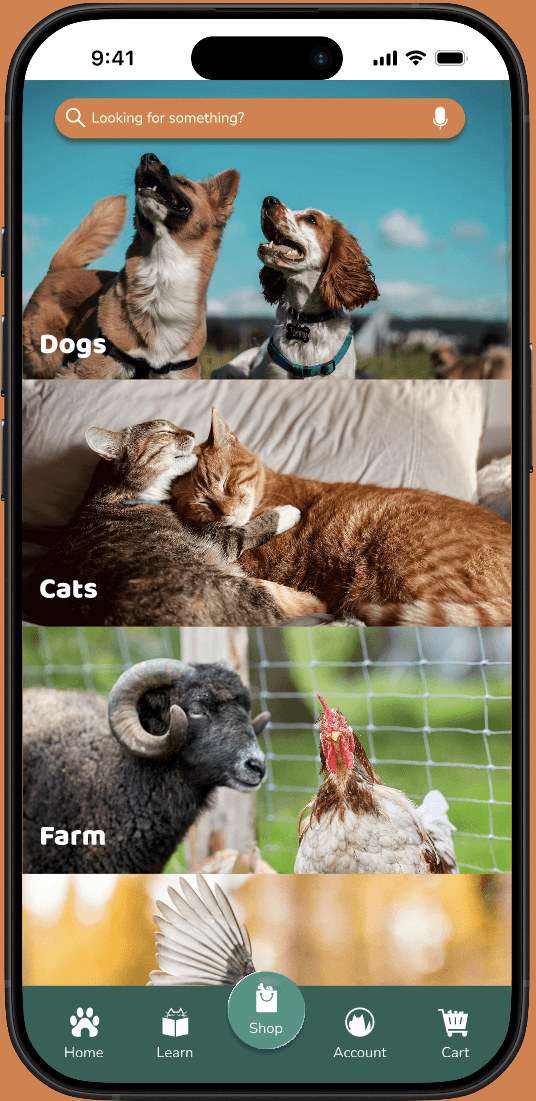
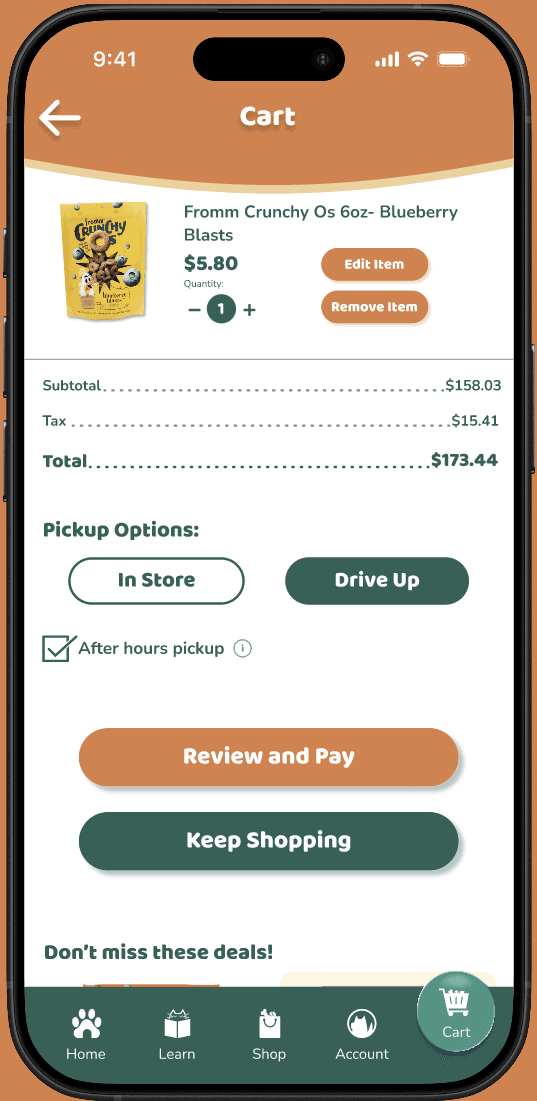
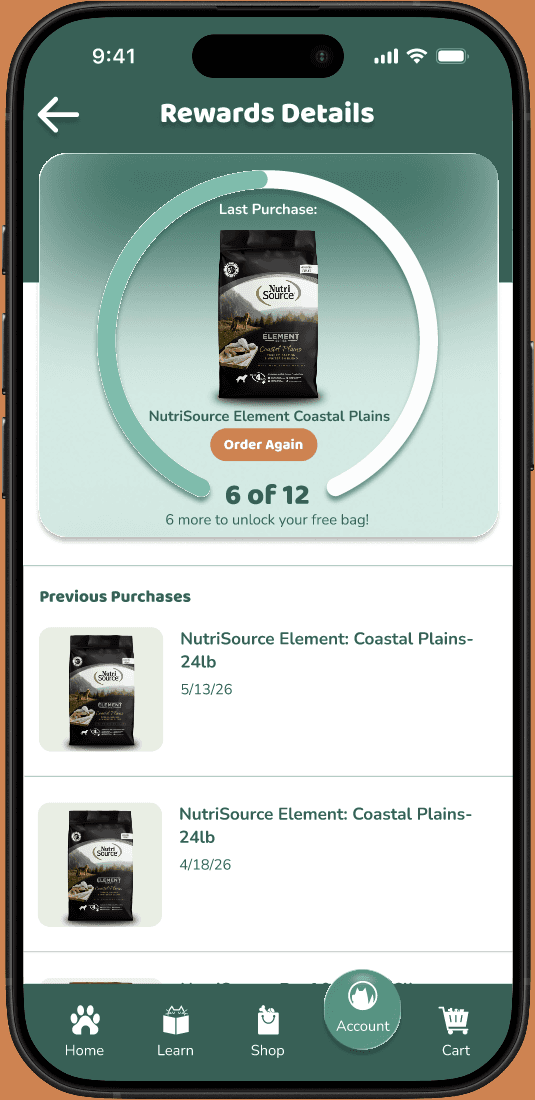
After finalizing the mockups, I linked the screens to create a hi-fi prototype that looks and feels like a final product. I used the business’s pre-existing color palette, text styles, and logos from their website to create a cohesive digital experience for users.
High Fidelity Prototype
Understanding the User
Understanding the User
1
Inconsistent product availability
Whether it's sold out items, special order delays, or a product that’s been discontinued, users feel like they’re relying on luck when they shop rather than on communication.
2
Lack of
information
Customers want to feed their pets the best quality food, but struggle to find unbiased info about clean brands and quality pet nutrition. Pricing information can also be difficult to gather.
3
Having to come in
and/or carry bags
There are various populations of customers who can’t or prefer not to come in or carry heavy bags of food. Many users even expect the convenience of drive-up orders.
4
No way to track
purchases or rewards
Sales are minimally advertised, and users can only check on their punch card status by coming in or calling. Cost-conscious users want a way to keep track on their own.
Personas
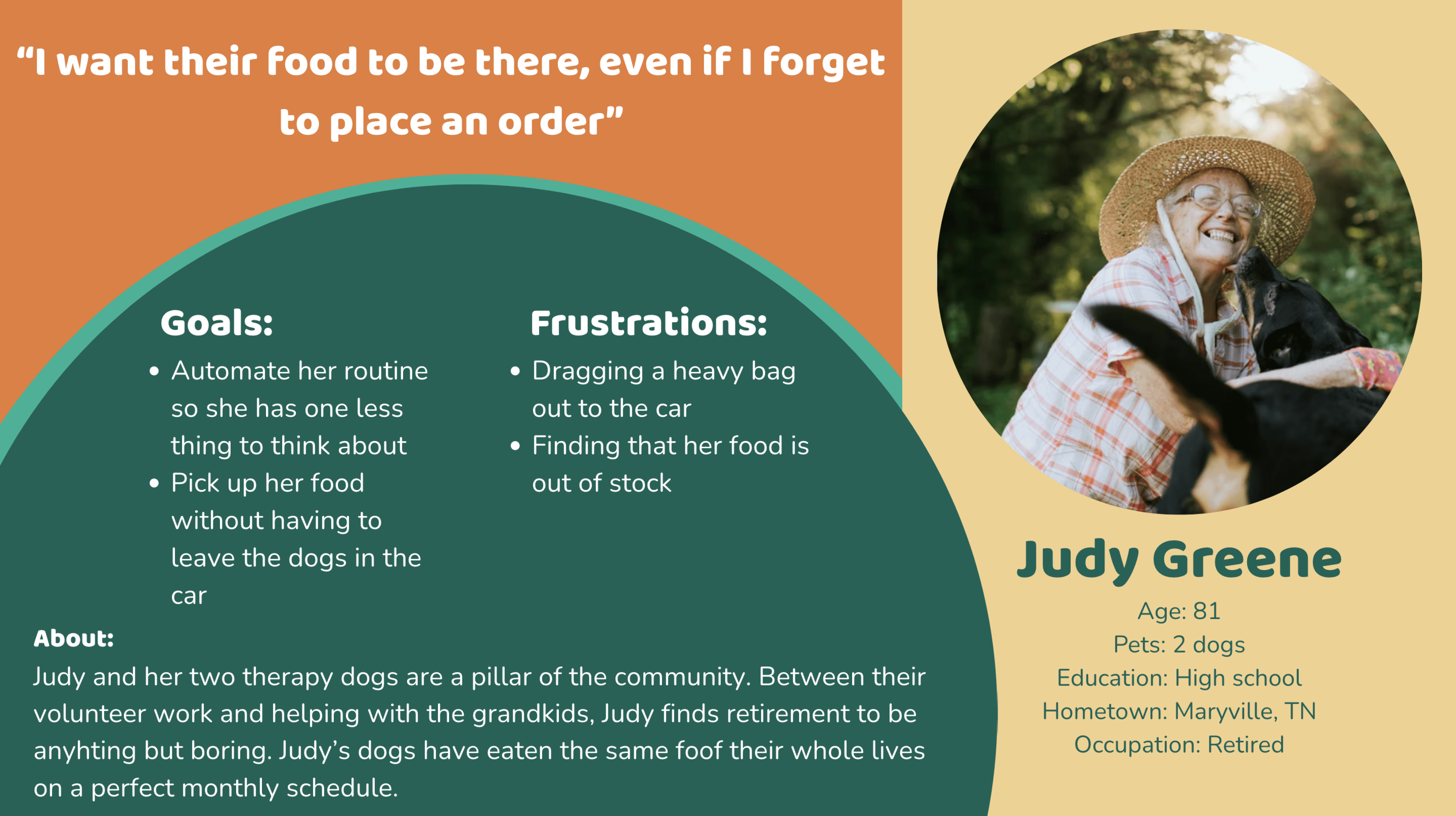
Problem Statement: Judy is an elderly shopper who needs automatic orders and drive up options so that she doesn’t have to worry about remembering to order or lifting heavy bags.
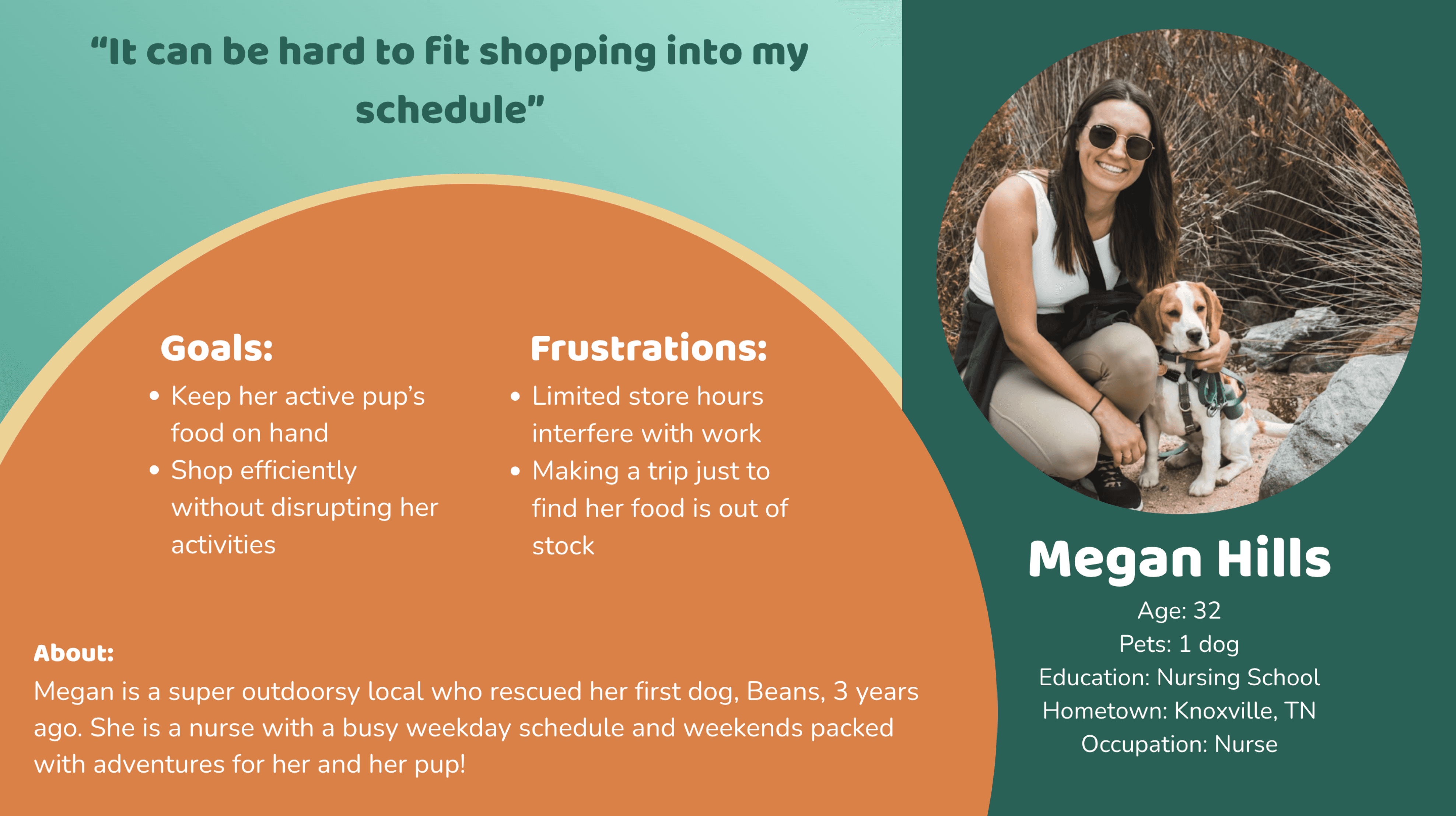
Problem Statement: Megan is a busy young professional who needs a reliable and flexible way to shop for her pet’s food so that shopping is convenient.
Problem Statement: Megan is a busy young professional who needs a reliable and flexible way to shop for her pet’s food so that shopping is convenient.
Problem Statement: Megan is a busy young professional who needs a reliable and flexible way to shop for her pet’s food so that shopping is convenient.
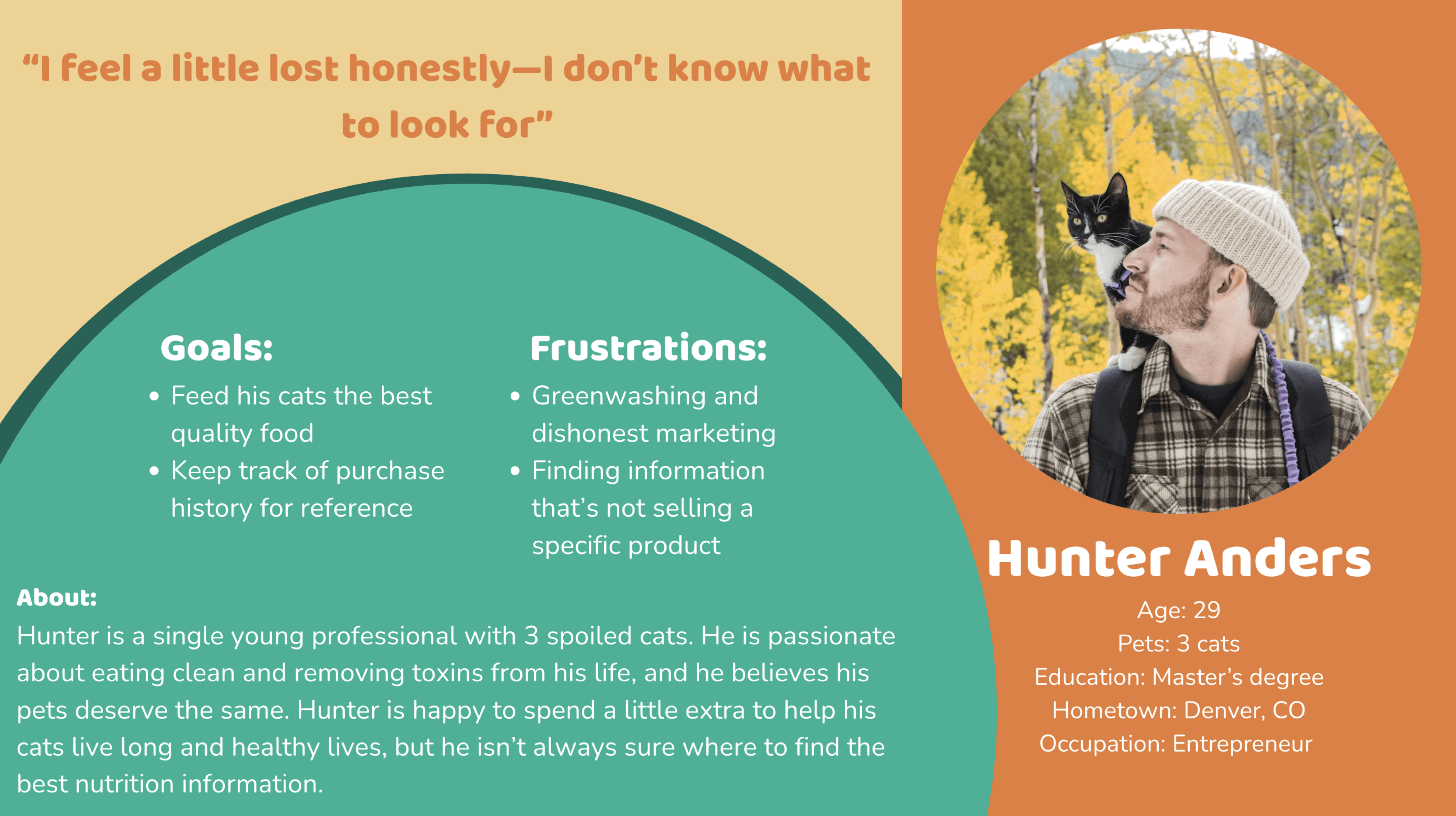
Problem Statement: Hunter is a health conscious pet parent who needs product education and recommendations so that his cats have the best nutrition possible.
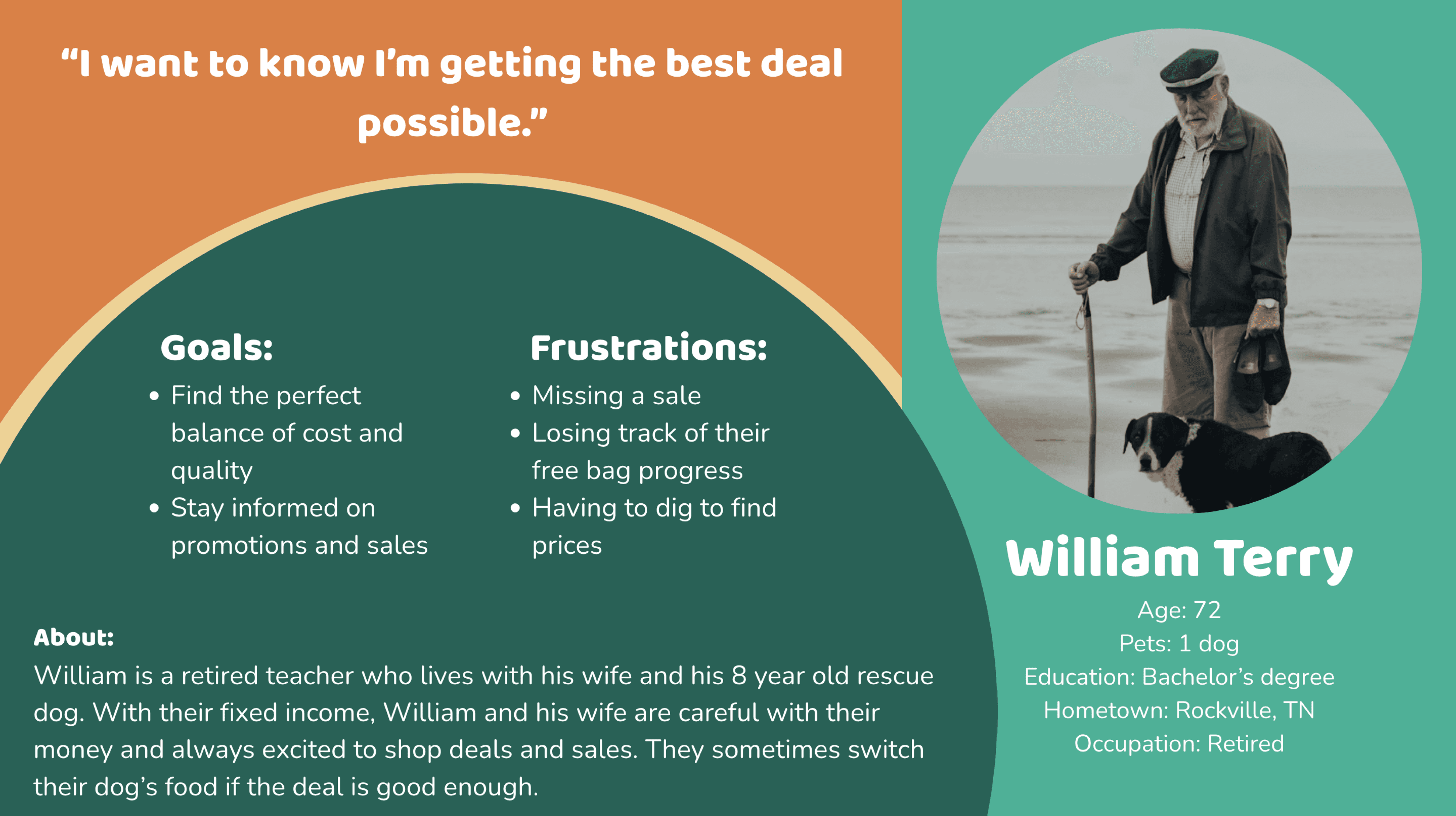
Problem Statement: William is a cost-conscious shopper who needs price transparency and alerts for sales so that he can be confident he never over pays.
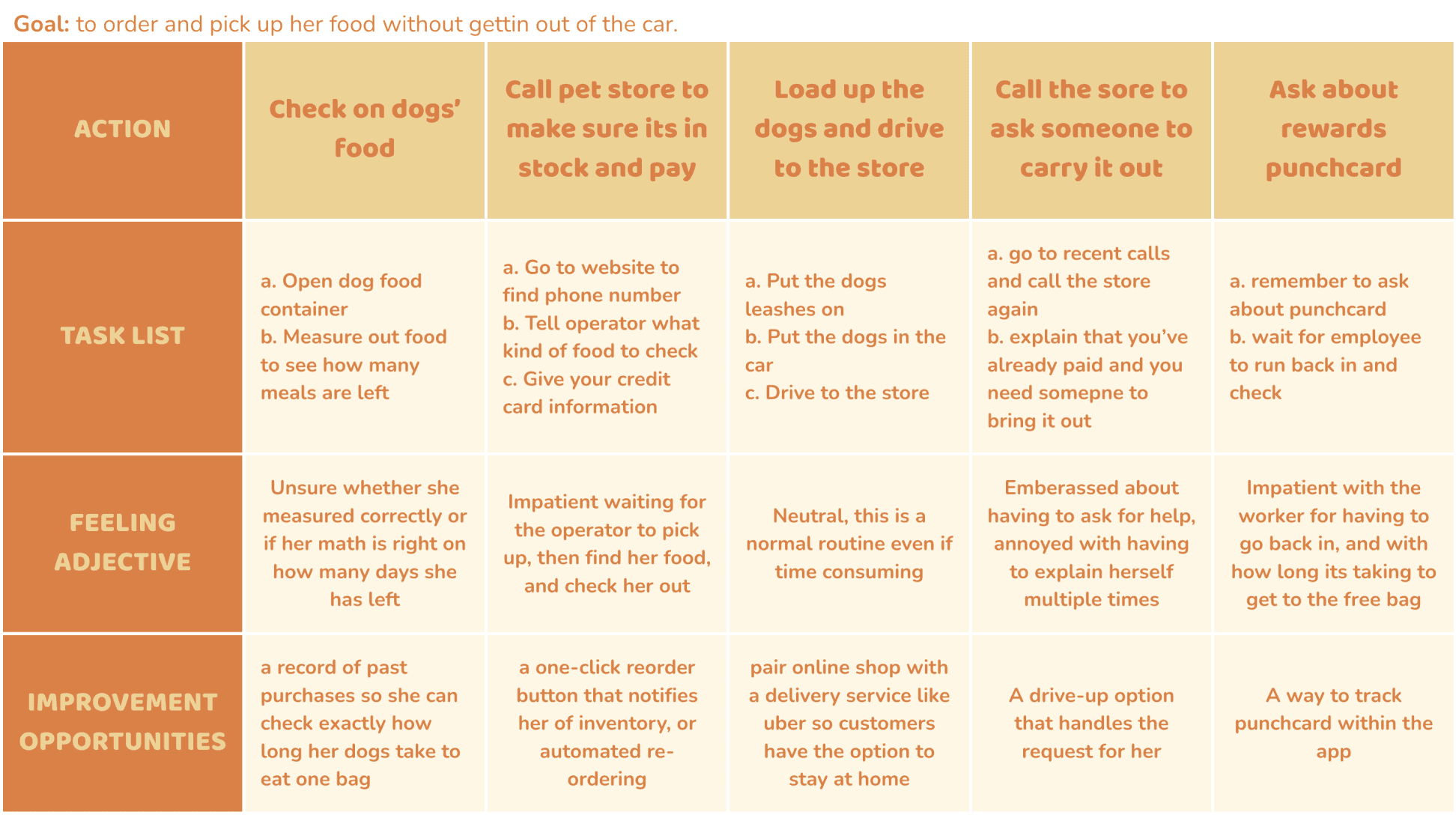
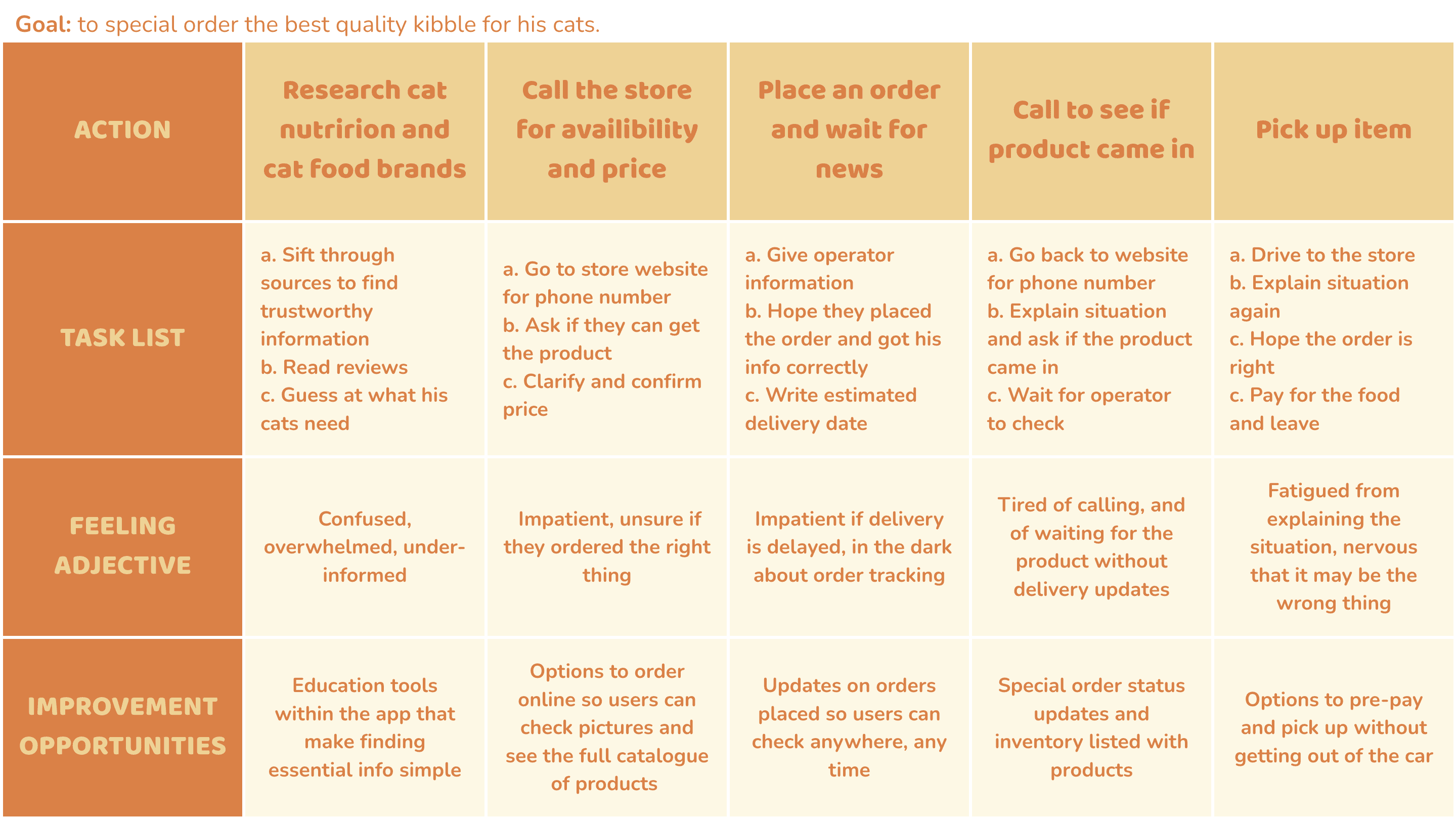
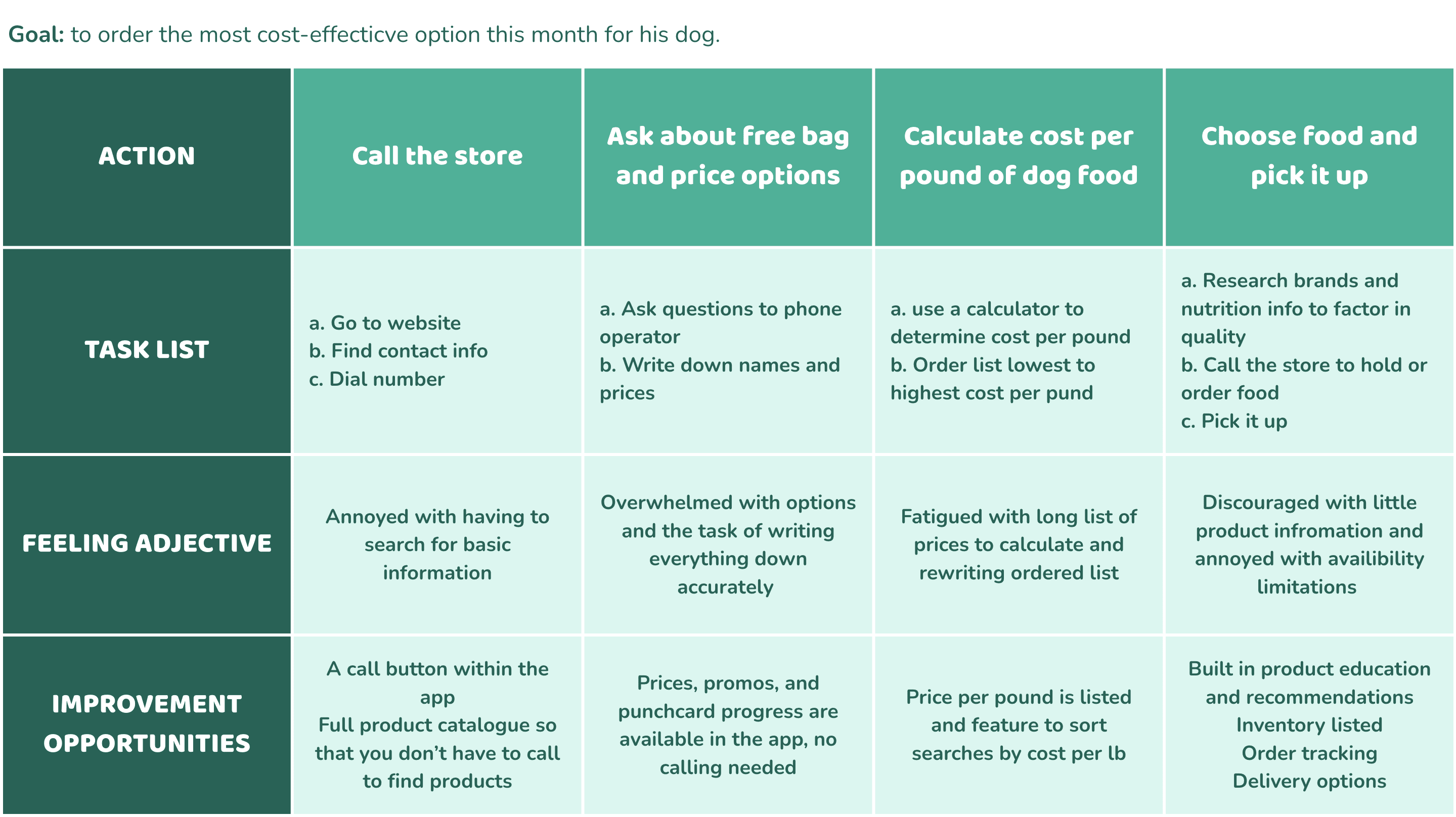
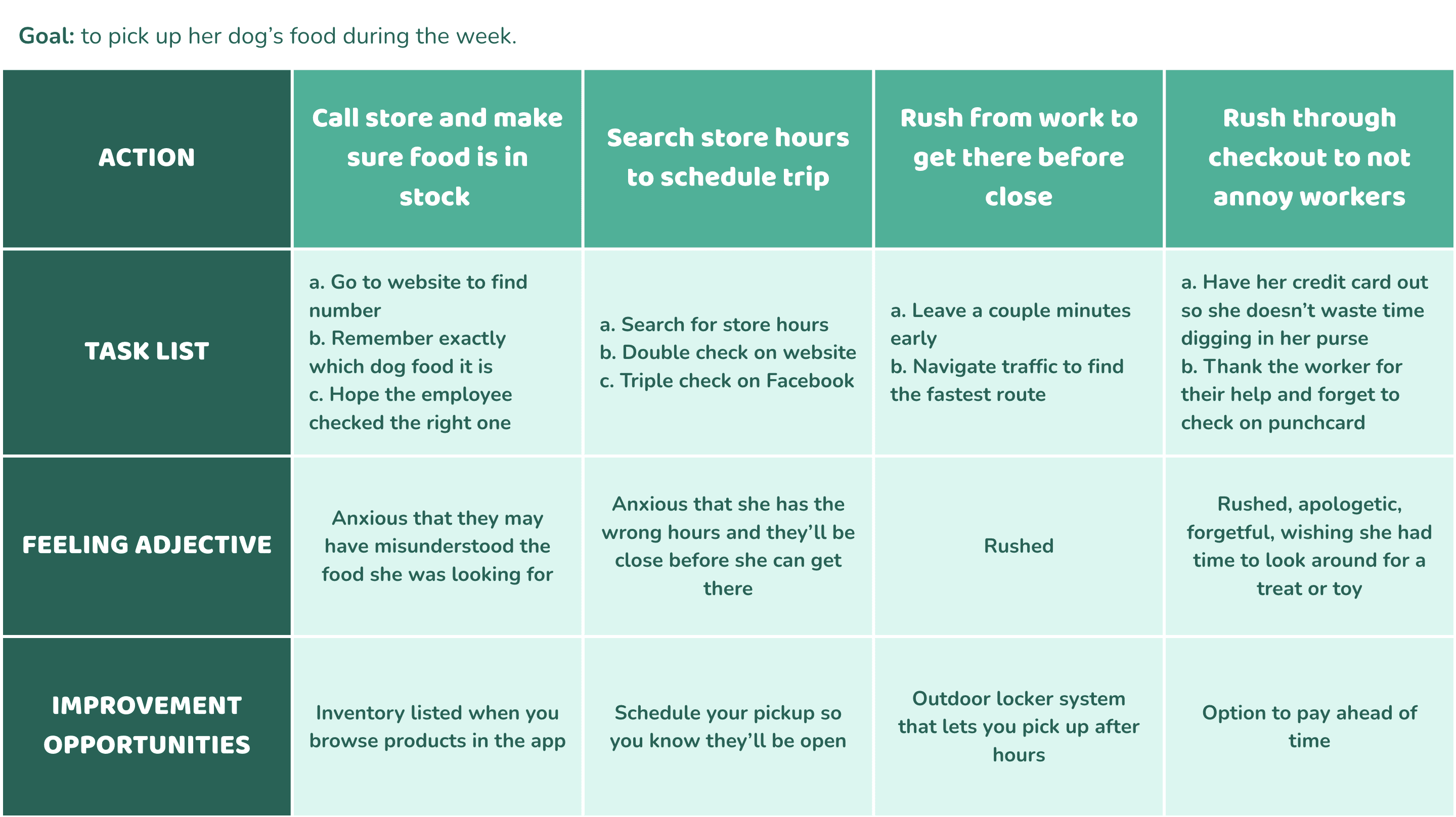
Journey Maps
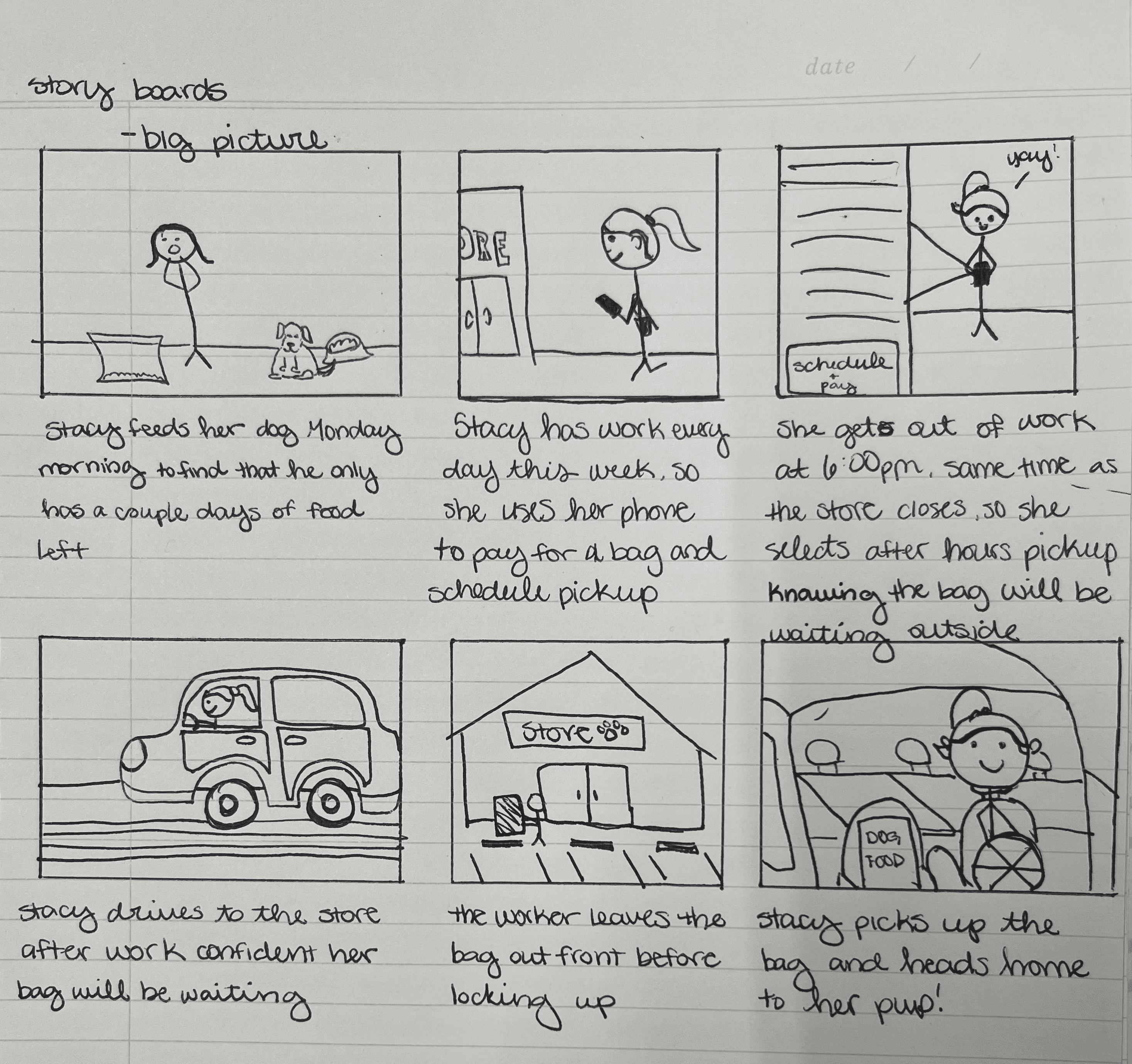
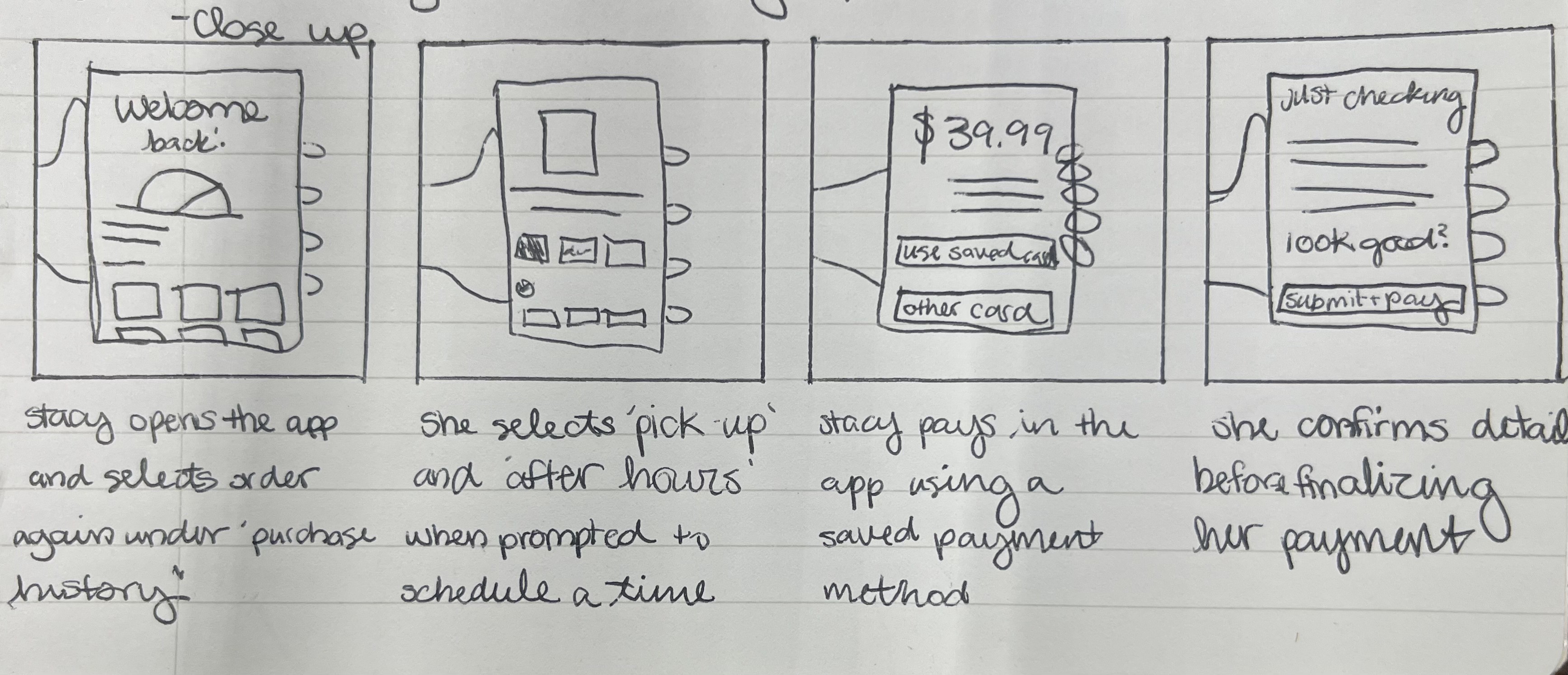
Storyboards
I created storyboards to understand my users and the core tasks they’d be using my product to accomplish from various types of devices.
User Flows
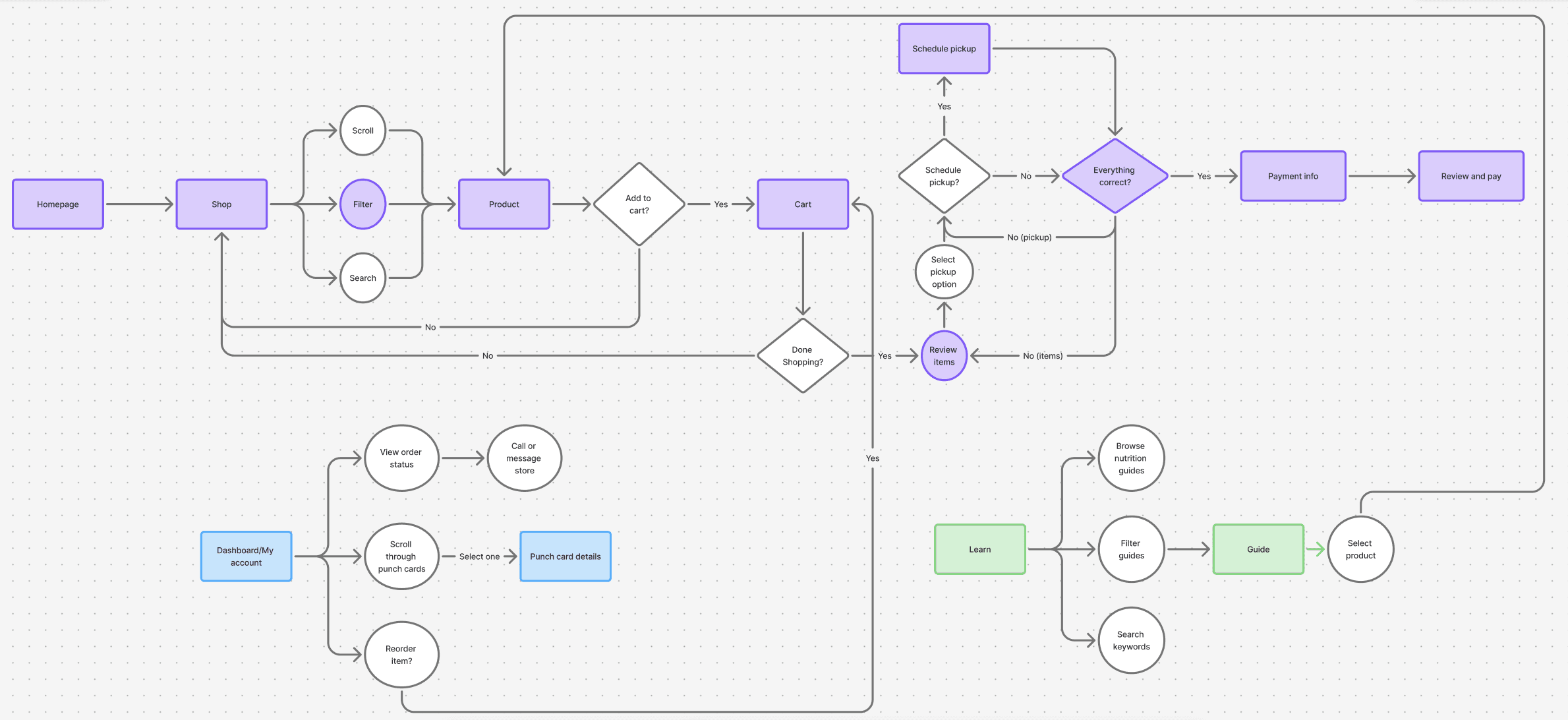
To understand each step involved in the core functions of the app, I created 3 user flows- illustrated below.
Paper Wireframes - Digital Wireframes - Low Fidelity Prototype - High Fidelity Prototype - Usability Studies - Paper Wireframes - Digital Wireframes - Low Fidelity Prototype - High Fidelity Prototype - Usability Studies
Paper Wireframes - Digital Wireframes - Low Fidelity Prototype - High Fidelity Prototype - Usability Studies - Paper Wireframes - Digital Wireframes - Low Fidelity Prototype - High Fidelity Prototype - Usability Studies
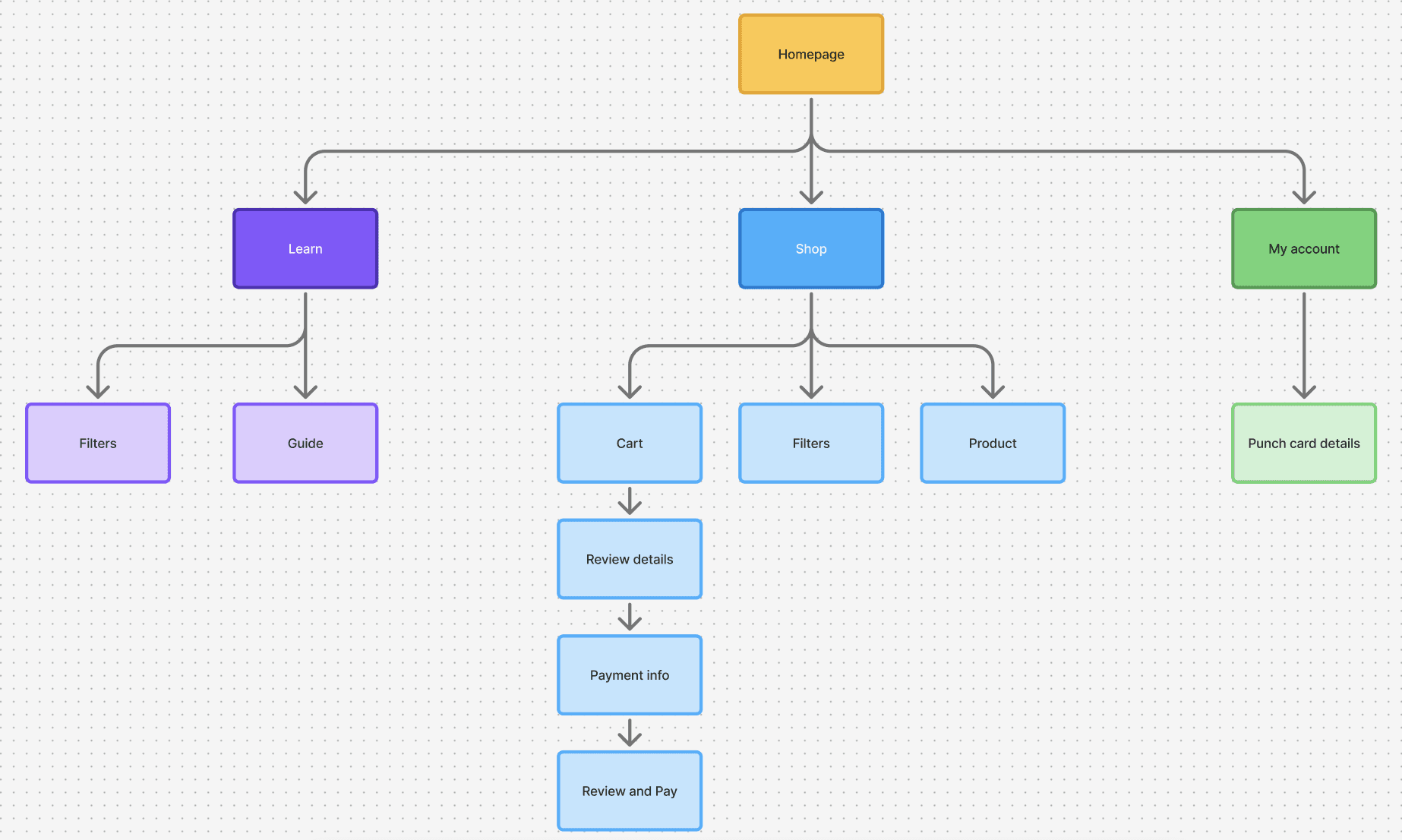
Sitemap
To prepare for wireframing, I created the following sitemap to determine what pages needed to be built, organize the pages, and visualize the site structure.
Paper Wireframes
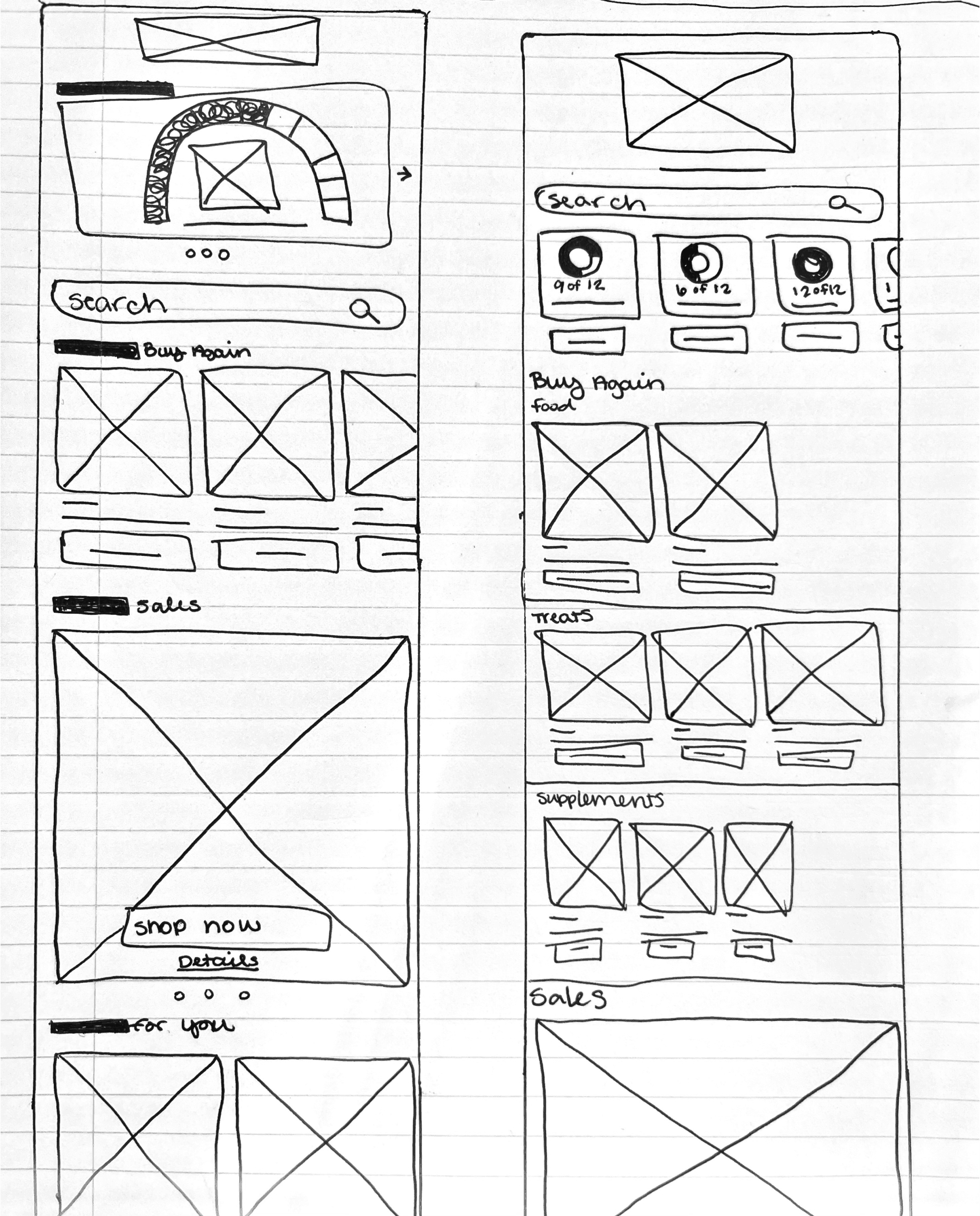
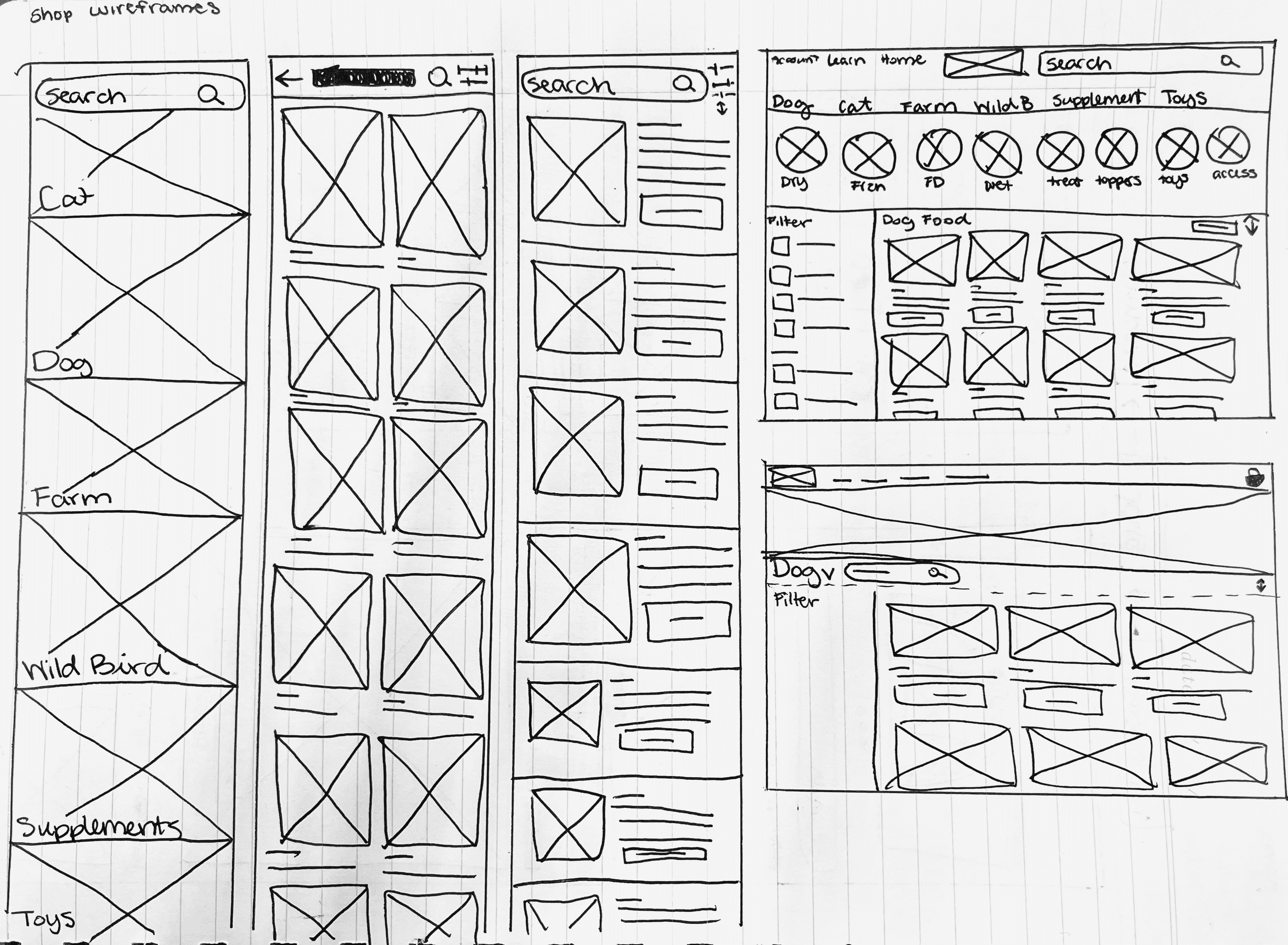
Using my personas, journey maps, storyboards, and IA to inform the core functions of the website, I began sketching wireframes with pen and paper, creating 2-3 ideas for each screen.
I also included sketches for desktop screens for each page in order to make sure each variation felt like it was designed specifically for its screen size.
Starting the Design
Starting the Design
Paper Wireframes
Using my personas, journey maps, storyboards, and IA to inform the core functions of the website, I began sketching wireframes with pen and paper, creating 2-3 ideas for each screen.
I also included sketches for desktop screens for each page in order to make sure each variation felt like it was designed specifically for its screen size.
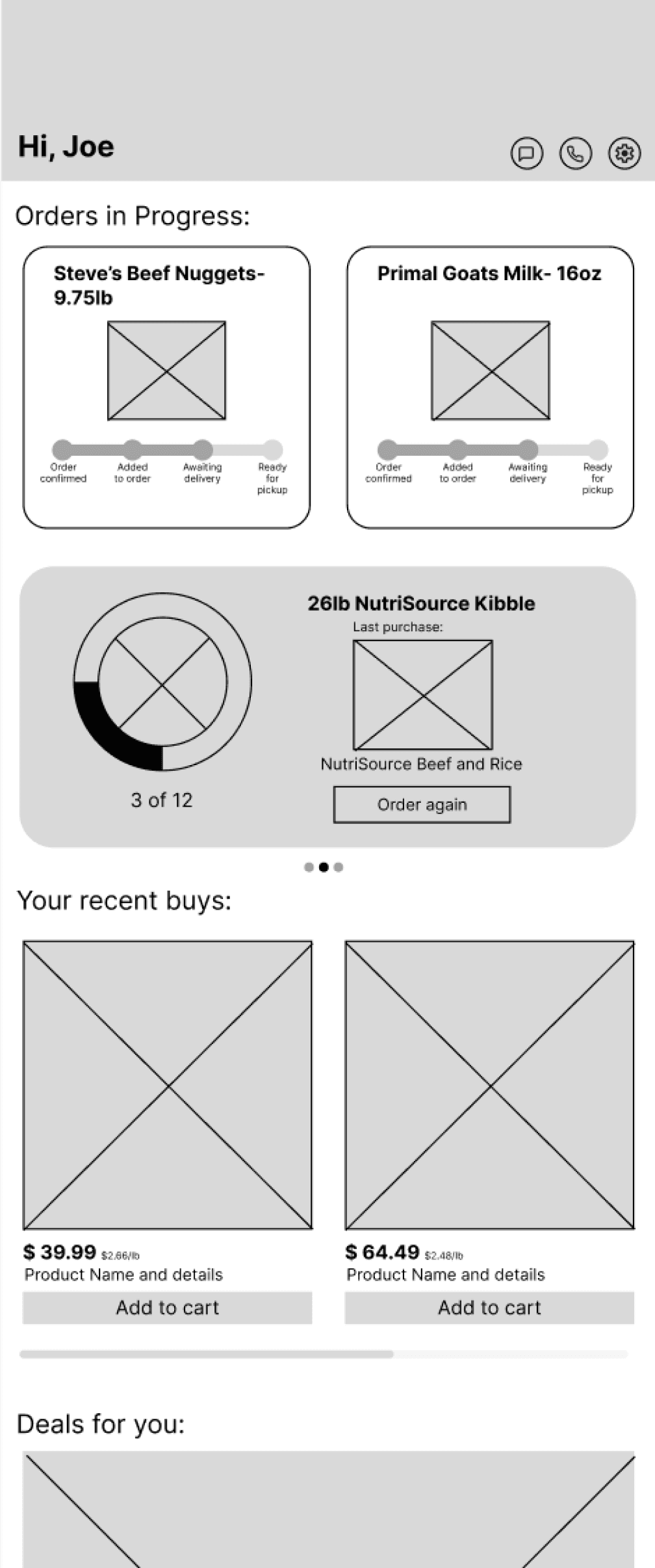
Order status is easy to find at the top of the account page
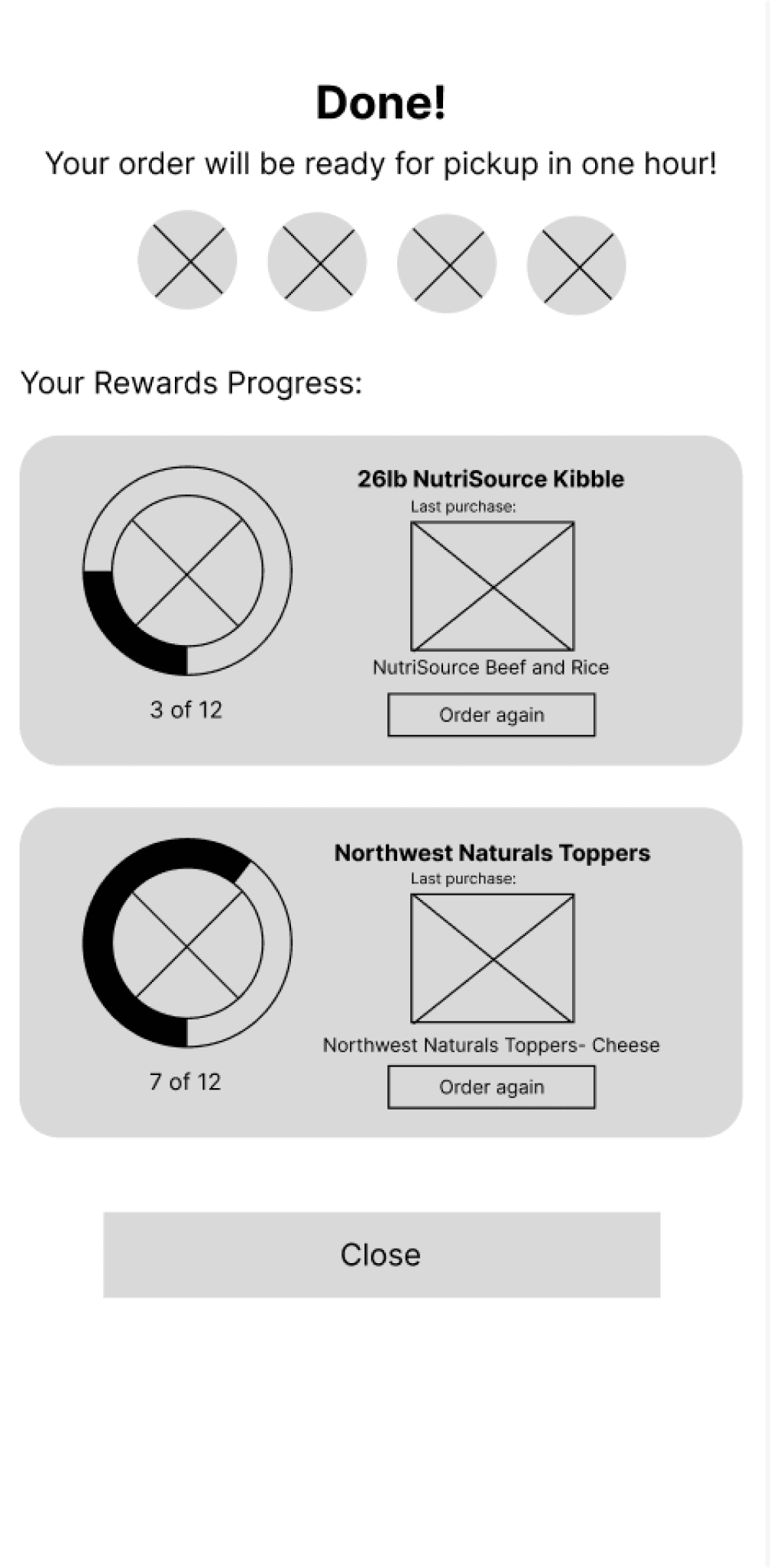
Confirmation screen lets users know their updated rewards status and that their order was placed successfully
Confirmation screen lets users know their updated rewards status and that their order was placed successfully
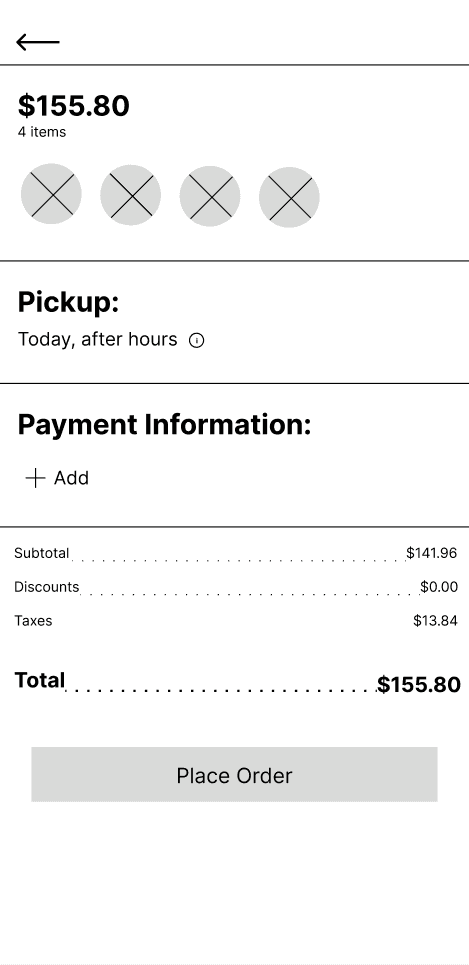
Review screen provides an opportunity to check all information before payments are made
I used Figma to create digital wireframes for each page. I modeled many of the pages after shopping apps I use and love, while also incorporating my knowledge of the business’s structure and how they operate.
I used Figma to create digital wireframes for each page. I modeled many of the pages after shopping apps I use and love, while also incorporating my knowledge of the business’s structure and how they operate.
Digital Wireframes
Digital Wireframes
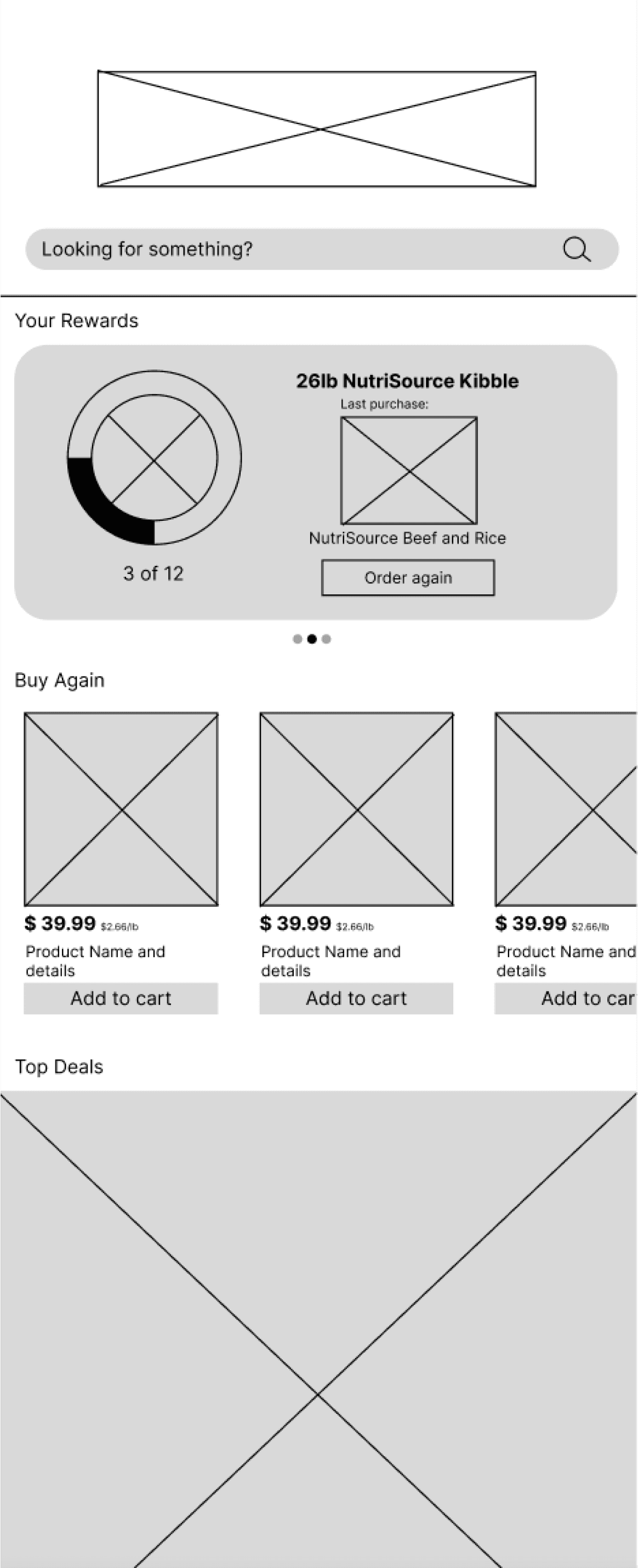
The three most commonly asked questions are addressed first thing on the home page
The three most commonly asked questions are addressed first thing on the home page
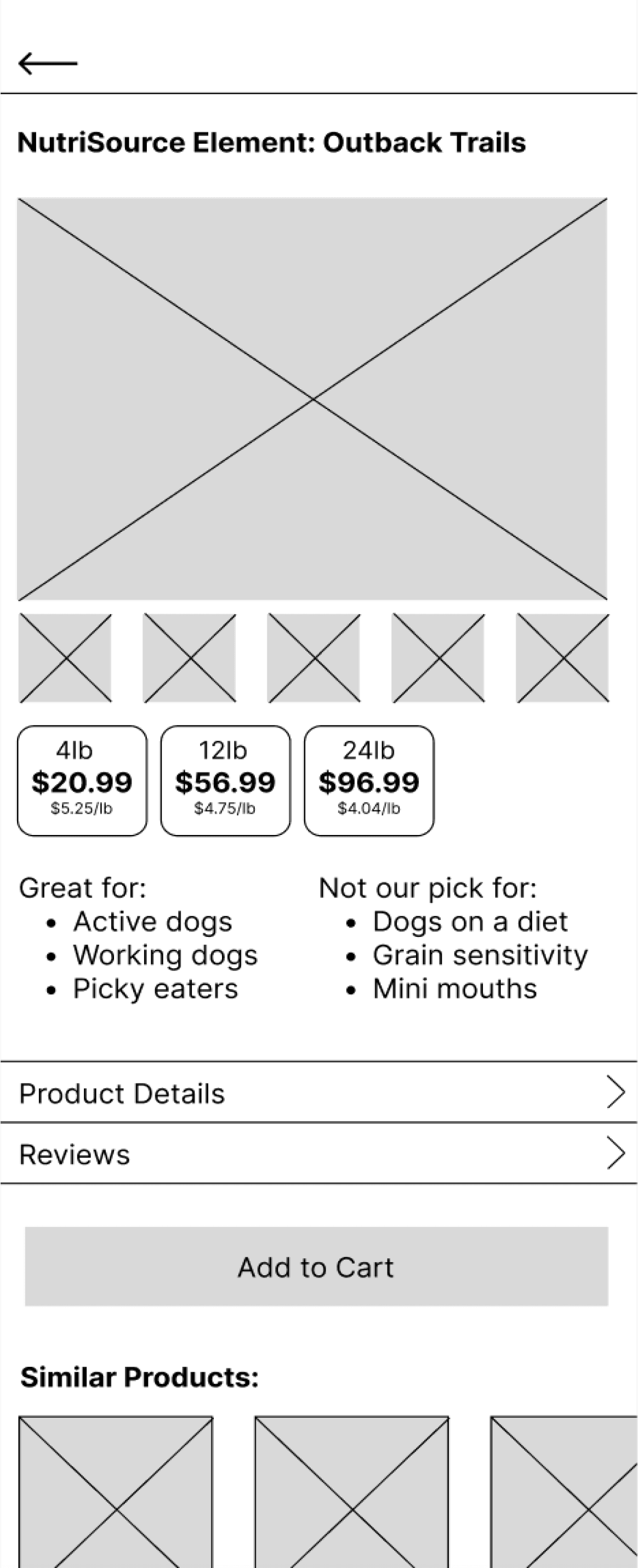
Expert advice from shop staff is built in to help users make the best choice for their pets
Low- Fidelity Prototype
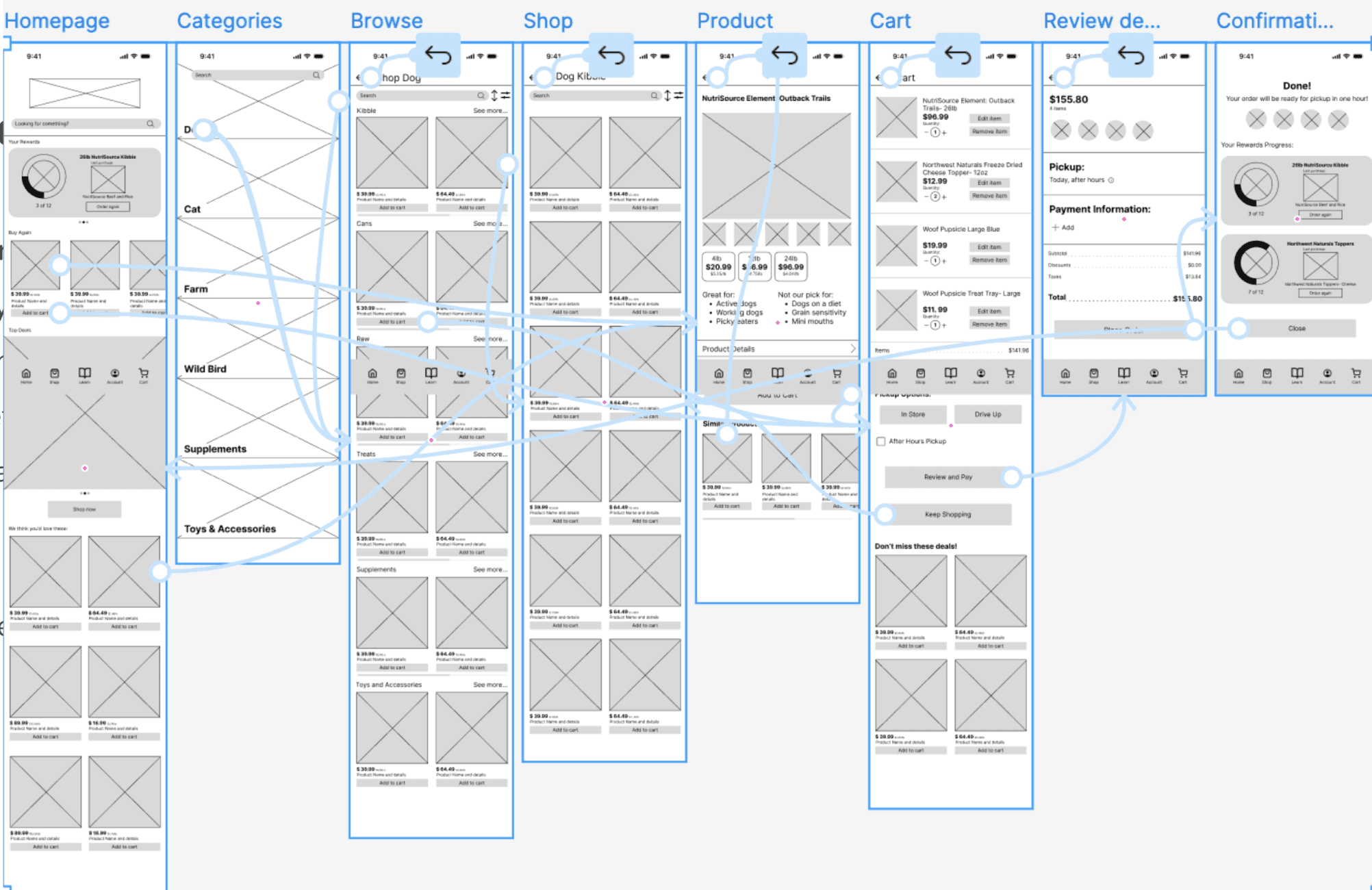
I created a low-fi prototype out of my initial wireframes to test functionality and get user feedback before finalizing the design and features.
Usability Study
I conducted a remote moderated usability study with 5 participants. Each session lasted 20 minutes as participants were prompted to complete core tasks within the prototype and give feedback after each one. At the end of the interview, participants also completed a system usability scale survey. The following patterns were used to form insights that could be factored into the next iteration of the product.
1
Learn page layout
is confusing
Moving forward: Featured article should go at the top, then establish article list format
2
Users can’t read
order status
Moving forward: Add an order details page with more information and make order card readable
3
Rewards system
is unclear
Moving forward: Add more text to both the card and the details page explaining the rewards system
4
Add to cart button
doesn’t go to cart
Moving forward: if a button says add to cart, it should either go to the cart page or trigger a small cart overlay
Going Forward
Next Steps - Takeaways - Next Steps - Takeaways -Next Steps - Takeaways -Next Steps - Takeaways -Next Steps - Takeaways -Next Steps - Takeaways -Next Steps - Takeaways -
1
Share my designs with other UX/UI designers with more experience for feedback on how I can improve my design.
2
Update my designs based on that feedback to improve functionality
3
Execute another round of user testing to keep user preferences centered
Next Steps
Takeaways
Impact
As technology continues to evolve and become more integrated into our lives, the ease and convenience of ordering online has become an expectation for many shoppers. This app provides that convenience to users without significantly changing the workload or business operations for the store owners and employees. Users can schedule pickup, check inventory, and keep track of rewards progress from their mobile device.
What I Learned
This project gave me valuable knowledge and experience in each step of the design process, including but not limited to:
User research and usability testing
Working within an established visual style
Design thinking and problem solving
Principles of design
Implementing user feedback
Preparing designs for developers
Let’s Connect!
Let’s Connect!
I am always looking for feedback to improve my designs and process. Please reach out to share your thoughts!
I am always looking for feedback to improve my designs and process. Please reach out to share your thoughts!
Research Summary
To understand user needs and frustrations, I conducted foundational research through surveys, interviews, and secondary research. I wanted to gain insight into the challenges pet owners face with shopping for pet supplies as well as any needs that aren’t being met with the methods they currently use.
Pain Points
User Research - Personas - Problem Statements - User Journey Maps - User Flows - Storyboards - User Research - Personas - Problem Statements - User Journey Maps - User Flows - Storyboards -
User Research - Personas - Problem Statements - User Journey Maps - User Flows - Storyboards - User Research - Personas - Problem Statements - User Journey Maps - User Flows - Storyboards -
Journey Maps
Paper Wireframes
Using my personas, journey maps, storyboards, and IA to inform the core functions of the website, I began sketching wireframes with pen and paper, creating 2-3 ideas for each screen.
I also included sketches for desktop screens for each page in order to make sure each variation felt like it was designed specifically for its screen size.
Usability Study
I conducted a remote moderated usability study with 5 participants. Each session lasted 20 minutes as participants were prompted to complete core tasks within the prototype and give feedback after each one. At the end of the interview, participants also completed a system usability scale survey. The following patterns were used to form insights that could be factored into the next iteration of the product.
1
Learn page layout
is confusing
Moving forward: Featured article should go at the top, then establish article list format
2
Users can’t read
order status
Moving forward: Add an order details page with more information and make order card readable
3
Rewards system
is unclear
Moving forward: Add more text to both the card and the details page explaining the rewards system
4
Add to cart button
doesn’t go to cart
Moving forward: if a button says add to cart, it should either go to the cart page or trigger a small cart overlay
Going Forward
Next Steps - Takeaways - Next Steps - Takeaways -Next Steps - Takeaways -Next Steps - Takeaways -Next Steps - Takeaways -Next Steps - Takeaways -Next Steps - Takeaways -
1
Share my designs with other UX/UI designers with more experience for feedback on how I can improve my design.
2
Update my designs based on that feedback to improve functionality
3
Execute another round of user testing to keep user preferences centered
Next Steps
Takeaways
Impact
As technology continues to evolve and become more integrated into our lives, the ease and convenience of ordering online has become an expectation for many shoppers. This app provides that convenience to users without significantly changing the workload or business operations for the store owners and employees. Users can schedule pickup, check inventory, and keep track of rewards progress from their mobile device.
What I Learned
This project gave me valuable knowledge and experience in each step of the design process, including but not limited to:
User research and usability testing
Working within an established visual style
Design thinking and problem solving
Principles of design
Implementing user feedback
Preparing designs for developers
1
Share my designs with other UX/UI designers with more experience for feedback on how I can improve my design.
2
Update my designs based on that feedback to improve functionality
3
Execute another round of user testing to keep user preferences centered
Next Steps
Problem Statement: Judy is an elderly shopper who needs automatic orders and drive up options so that she doesn’t have to worry about remembering to order or lifting heavy bags.
Problem Statement: Megan is a busy young professional who needs a reliable and flexible way to shop for her pet’s food so that shopping is convenient.
Problem Statement: Hunter is a health conscious pet parent who needs product education and recommendations so that his cats have the best nutrition possible.
Problem Statement: William is a cost-conscious shopper who needs price transparency and alerts for sales so that he can be confident he never over pays.
Personas
Sitemap
To prepare for wireframing, I created the following sitemap to determine what pages needed to be built, organize the pages, and visualize the site structure.
The three most commonly asked questions are addressed first thing on the home page
Expert advice from shop staff is built in to help users make the best choice for their pets
Low- Fidelity Prototype
I created a low-fi prototype out of my initial wireframes to test functionality and get user feedback before finalizing the design and features.
Order status is easy to find at the top of the account page
Confirmation screen lets users know their updated rewards status and that their order was placed successfully
Review screen provides an opportunity to check all information before payments are made
Usability Study
I conducted a remote moderated usability study with 5 participants. Each session lasted 20 minutes as participants were prompted to complete core tasks within the prototype and give feedback after each one. At the end of the interview, participants also completed a system usability scale survey. The following patterns were used to form insights that could be factored into the next iteration of the product.
1
Learn page layout
is confusing
Moving forward: Featured article should go at the top, then establish article list format
2
Users can’t read
order status
Moving forward: Add an order details page with more information and make order card readable
3
Rewards system
is unclear
Moving forward: Add more text to both the card and the details page explaining the rewards system
4
Add to cart button
doesn’t go to cart
Moving forward: if a button says add to cart, it should either go to the cart page or trigger a small cart overlay
Mockups
I used insight 1 from my usability study to tweak the learn page so that the layout would be easier to navigate. The featured article was moved to the top of the page so that it is fully visible above the fold and sneak peek text was added to the featured article to indicate that clicking it will lead to a full article
Based on insight 2, I changed the ‘orders in progress’ cards in order to make the text easier to read.
I also added the expected delivery date to the cards so that users feel more informed about their orders.
Before Usability Study:
After Usability Study:
Before Usability Study:
After Usability Study:
After finalizing the mockups, I linked the screens to create a hi-fi prototype that looks and feels like a final product. I used the business’s pre-existing color palette, text styles, and logos from their website to create a cohesive digital experience for users.
High Fidelity Prototype
This project gave me valuable knowledge and experience in each step of the design process, including but not limited to:
User research and usability testing
Working within an established visual style
Design thinking and problem solving
Principles of design
Implementing user feedback
Preparing designs for developers
Going Forward
Next Steps - Takeaways - Next Steps - Takeaways -Next Steps - Takeaways -Next Steps - Takeaways -Next Steps - Takeaways -Next Steps - Takeaways -Next Steps - Takeaways -
Takeaways
Impact
As technology continues to evolve and become more integrated into our lives, the ease and convenience of ordering online has become an expectation for many shoppers. This app provides that convenience to users without significantly changing the workload or business operations for the store owners and employees. Users can schedule pickup, check inventory, and keep track of rewards progress from their mobile device.
What I Learned
1
Share my designs with other UX/UI designers with more experience for feedback on how I can improve my design.
2
Update my designs based on that feedback to improve functionality
3
Execute another round of user testing to keep user preferences centered
Next Steps